A reliable spreadsheet classic built for productivity
Microsoft Excel 2016 represents one of the most widely used spreadsheet applications ever released, serving businesses, students, analysts, and professionals across countless industries. Designed as part of the Office 2016 suite, the software focuses on data organization, calculation, and visualization while maintaining familiarity for long time users.
Top Recommended Alternative

Even years after its release, Microsoft Excel 2016 remains valued for stability and efficiency rather than constant reinvention. Its strongest advantage lies in powerful data management, allowing users to handle everything from simple budgets to complex financial models. What makes it stand out is how it balances accessibility with professional depth.
Core features and spreadsheet functionality
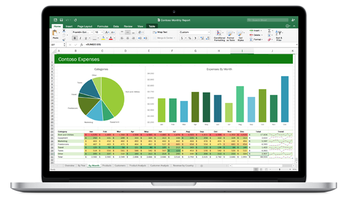
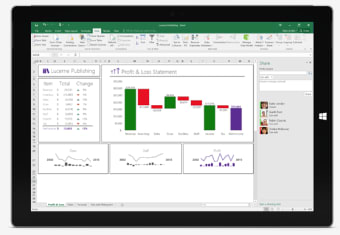
Microsoft Excel 2016 delivers a wide range of tools for organizing and analyzing information. Functions, formulas, and pivot tables allow users to transform raw data into meaningful insights. Features such as conditional formatting and advanced filtering reinforce advanced spreadsheet tools, making large datasets easier to interpret. Chart creation is another highlight, offering visual representations that update dynamically as data changes. Business users benefit from forecasting tools and recommended charts that simplify analysis.
Data validation and sorting systems remain reliable and fast. Even large files perform smoothly on capable systems, although extremely large spreadsheets may still cause slowdowns, making it confusing when handling massive workloads. Excel 2016 integrates smoothly with other Office applications such as Word and PowerPoint, allowing charts and tables to be shared easily. This workflow flexibility supports Office suite integration, which remains essential in professional environments. However, complex formulas can become difficult to manage.
User experience and support status
The interface in Excel 2016 prioritizes clarity and familiarity. Ribbon menus categorize tools logically, helping users locate features quickly. Customizable toolbars allow individuals to tailor workflows, supporting efficient workspace layout for frequent tasks. Performance remains stable on most systems, and offline functionality ensures productivity without internet access. However, the design feels dated compared to newer Office releases; the visuals are simple but outdated for users expecting modern visuals.
Since Excel 2016 is part of a perpetual license version, recent updates have focused primarily on security patches and compatibility fixes rather than new features. Microsoft released cumulative updates addressing vulnerabilities, improved stability on newer Windows versions, and enhanced compatibility with modern file formats. Updates also resolved printing issues, calculation errors in certain formulas, and occasional crashes when opening large workbooks. These improvements highlight security maintenance updates, ensuring continued usability even without feature expansion.
Extended support lifecycle
Microsoft Excel 2016 follows Microsoft’s fixed lifecycle policy, with mainstream support ended and extended security updates scheduled through October 2025. This means the version continues receiving critical security patches but no new feature development. For organizations prioritizing long-term system stability over continuous upgrades, this predictable lifecycle model supports controlled IT planning.
Compatibility with modern file formats
Excel 2016 maintains compatibility with newer .xlsx, .xlsm, and macro-enabled formats created in later Office versions. While some advanced cloud-based functions may not fully translate backward, most formulas, pivot tables, and chart structures remain intact. This backward and forward compatibility allows mixed-version teams to collaborate without major formatting conflicts.
Power query and power pivot integration
Excel 2016 includes built-in Power Query (Get & Transform) and Power Pivot tools for advanced data modeling. These features allow users to import external datasets, clean information, and create relationships between multiple tables without third-party software. For analysts handling structured reporting, this built-in business intelligence capability adds substantial depth beyond basic spreadsheet use.
VBA and macro automation support
Visual Basic for Applications (VBA) remains fully supported in Excel 2016, enabling workflow automation and custom function development. Many enterprises still rely on legacy macro-enabled systems built around this version. Its stable VBA environment makes it particularly valuable in finance and operations departments where automated reporting templates are essential.
Deployment in enterprise environments
Excel 2016 is widely deployed in controlled corporate networks where offline reliability and local installation are preferred over subscription-based cloud models. Volume licensing options and on-premise installation make it suitable for regulated industries with strict data governance policies. This deployment flexibility continues to sustain its relevance in enterprise IT infrastructures.
A dependable spreadsheet tool that still gets the job done
Microsoft Excel 2016 remains a dependable productivity tool that continues to deliver strong data management, reliable performance, and familiar workflows for everyday professional use. While it lacks the modern visuals and cloud-focused innovations of newer versions, its stability and powerful core features still make it a practical choice for offline productivity and structured data analysis across business, academic, and personal projects.